
Track your GLP-1 journey. Right in Google Calendar.
Private by default, separate from your existing calendar, and set up on this page in about a minute.
Product proof
See it in your calendar
A separate GLP-1 calendar keeps the habit visible without touching the rest of your schedule.
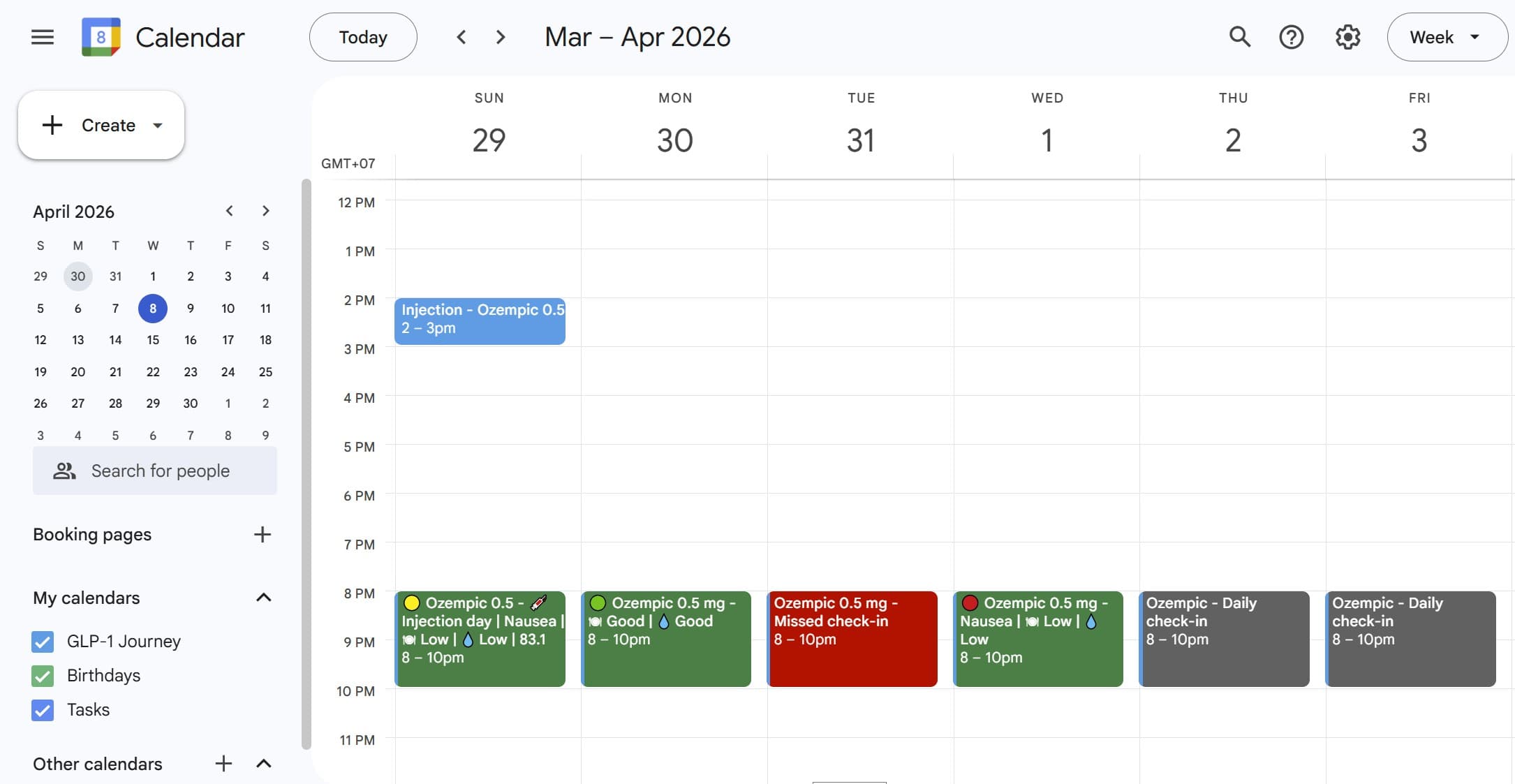
Separate calendar
We create a GLP-1 calendar that stays separate from your existing events.
Visible progress
Completed, missed, and pending days stay readable at a glance over the week.
01
Approve access
Google asks you to approve calendar access so we can create your GLP-1 check-in calendar.
02
We set it up
We create a separate calendar and place your recurring daily check-in there.
03
You track in Calendar
Your reminder and your progress now live inside Google Calendar, not another app.
Reassurance
Simple, private, and under your control
The most important boundaries should be obvious before you connect anything.
What we do
Create a separate GLP-1 Journey calendar
Add one daily check-in reminder inside that calendar
Update that check-in so you can scan your progress over time
What we do not do
Read your other calendar events
Require another app to remember every day
Replace your doctor or give medical advice
Private by default
We create a separate calendar - your existing events are untouched
Your check-ins are visible only to you unless you choose to share the calendar
You can delete everything anytime in Google Calendar
No credit card required
Not another app
This is calendar-based habit tracking, not a dashboard you have to remember to open every day.
FAQ
Questions people usually ask first
Privacy, control, and daily effort should be obvious before someone commits.
Do I need to install anything?
No. Everything works inside your Google Calendar.
Do you have access to my calendar?
No. We only create and update a separate calendar for your check-ins. We do not read your other events.
Are my check-ins private?
Yes. They are only visible to you unless you choose to share your calendar.
Can someone else see this calendar?
Not unless you explicitly give them access. If you want a companion to follow along, you can choose to share the calendar with them yourself.
Can I remove it anytime?
Yes. You can delete the calendar or events whenever you want.
How long does it take each day?
About 20 seconds.
Can I change the reminder time?
Yes. You can move the event directly in your calendar.
What happens if I miss a day?
You can still fill it later. Your calendar will reflect it.
Is this medical advice?
No. This is a tracking tool to help you stay consistent.
Is it free?
Yes, completely free.
Will I get emails?
Not as part of the MVP today. In the future we may offer product updates or other services by email, and you will be able to unsubscribe.